
How to Root Galaxy S4 SGH-I337/ SPH-L720/ SGH-M919 and GT-I9505
www.prasadcellcare.com
And now XDA member djrbliss has developed a root tool-kit that can easily root most Qualcomm-based Galaxy S4 devices. Actually, the root exploit, called Motochopper, is a script originally developed for rooting Motorola devices but it can also be used for rooting the Qualcomm-based branded variants of the Samsung Galaxy S4, including the following models and works on Windows, MAC and Linux:
- AT&T Galaxy S4 SGH-I337
- Sprint Galaxy S4 SPH-L720
- T-Mobile Galaxy S4 SGH-M919
- US Cellular SCH-R970
- Galaxy S4 LTE GT-I9505
- Canadian SGH-I337M, Rogers, Bell, Telus
NOTE
This method is no longer working on T-Mobile Galaxy S4 SGH-M919 with the latest OTA update. If you happen to be one with a newer firmware version than with what the device was released, please use this tutorial.Also See:
How to Root Samsung Galaxy S4 GT-I9500How to Root Verizon Galaxy S4 SCH-I545
Root and Install CWM Recovery on Sprint and T-Mobile Galaxy S4
Using the Motochopper Root Tool-Kit:
- Download the root exploit and extract it on your desktop: motochopper.zip
- For Windows users: download and install Samsung USB Drivers or Kies on your PC.
- Go to Settings> Developer options and turn on USB Debugging mode from Developer Options on your phone. If you are unable to see “Developer Options” under device Settings, enable it using this guide.
- Now connect your Galaxy S4 to computer using the USB cable that came with your phone.
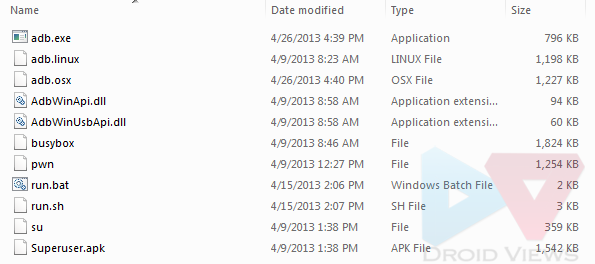
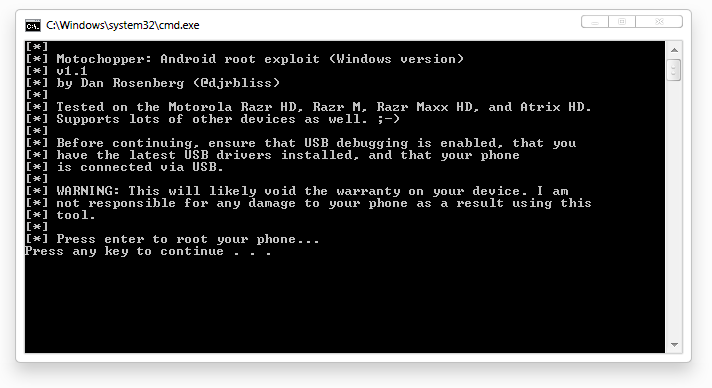
- Windows Users: If you are using Windows, navigate to the extracted folder and run the “run.bat” file. This will popup a terminal window. Just follow the on-screen prompt and done.
- MAC and Linux Users: Navigate to the extracted directory, launch a terminal window and issue the following command:
cd Downloads/motochopper
cd motochopper
chmod 755 *
sudo sh run.sh
- Approve the ADB connection from your PC on your device and do not forget to select “Agree” when the phone asks to “Verify Apps” during the rooting procedure.
Post a Comment